🔳 CosterGraphics.Systems.OutlineSystem
🧩 OutlineSystem Components Overview
🧠 MonoBehaviours
🔳Outline3D : MonoBehaviour
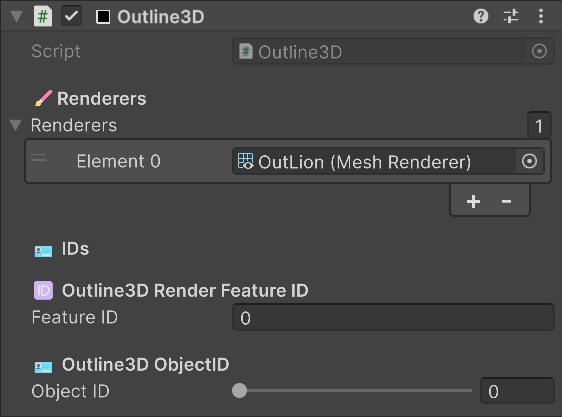
✍️Description:
The Outline3D MonoBehaviour component marks a GameObject as outline-eligible/receiver and is used by the Renderer Features to filter out the objects that need to be rendered by it into the mask textures that are then used by the composite outline shaders.
Instead of filtering objects by GameObject layers or by Renderer Layers, which are project specific and probably already in use by you, I have chosen to filter by component instead for this system which is possible trough the use of Command Buffers and the RasterCommandBuffer.DrawMesh() and DrawRenderer() methods.
Using a component to filter also has the advantage that outlines can simply be enabled or disabled by enabling and disabling the Outline3D component on a GameObject which makes this system very easy to use espescially for per-object selection outlines.
Responsibilities:
- Registers itself with the Renderer Feature via static Outline3D.AllActiveOutlines list
- Provides references to the
🔳Outline3Dobject's Mesh or Skinned Mesh Renderers - Stores per-object data (
🆔FeatureID,🪪ObjectID)
Read more about the 🔳Outline3D component on the component pages:
- 🔳 Outline3D Component - OutlineSystem
🔳Outline3DMonoBehaviour Component
📜 Scriptable Renderer Features
🧑🎨Outline3DRendererFeature : ScriptableRendererFeature
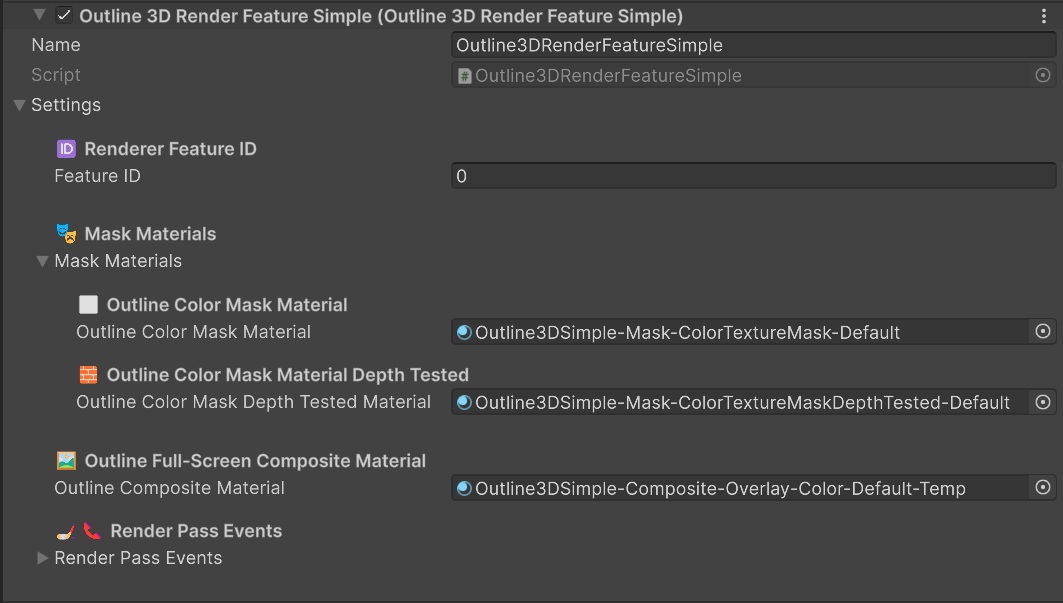
Description: Handles all rendering and compositing work.
Typical passes:
1. 🎭 Mask Pass
- Draws all
🔳Outline3Dobjects into a dedicated mask texture - Produces a binary black or white silhouette
- Optional: also capture depth or normals for contours
2. 🖼️ Composite Pass
- Full-screen pass
- Samples masks
- Dilates / colors / blends
- Performs Edge Detection
- Writes result onto camera color buffer
Read more about what each 🧑🎨Outline3DRenderFeature does on the Renderer Features pages:
- 🧑🎨 Renderer Features Overview - OutlineSystem Renderer Features Overview
- 🧑🎨Outline3DRenderFeatureSimple - Outline3D Render Feature Simple
- 🧑🎨🧑🎨Outline3DRenderFeatureBasic - Outline3D Render Feature Basic
- 🧑🎨🧑🎨🧑🎨Outline3DRenderFeatureAdv - Outline3D Render Feature Advanced
- 🧑🎨🧑🎨🧑🎨🧑🎨Outline3DRenderFeaturePro - Outline3D Render Feature Pro
🕶️ Shaders
🎭 Mask Shaders
🔁 Intermediate Buffer Shaders
🖼️ Full-Screen Composite Shaders
✍️Description:
The Full-Screen Shader Graph Composite shaders that come with the OutlineSystem are like the 'meat' of the whole system. The OutlineSystem is designed for easily swapping between different outline Composite shader materials, to render different types of outlines dishes that require completely different types of raw or prepped ingredients.
Because there are so many possible combinations and types of Composite outlines that can be created the system splits them up into main categories for ⭕Silhouette outlines, 🌐Contour outlines and 🐦🔥Hybrid outlines.
⭕Silhouette outlines are for lines that only go around the perimiter of the masked shapes (think thick sticker like outer edges and basic selection type outlines.)
🌐Contour outlines are for more stylistic/hand drawn type of outlines that can look like actual pen and ink drawings and that can go 'over' the shapes and edges of objects inside of the masks.
🐦🔥Hybrid outlines are for combinations of Silhouette, Contour and Overlay outlines. For instance for combinations of transparent colored overlays and a silhouette outlines look in the Hybrid shader folders.
The system also comes with a lot of extra composite 🔲Overlay shaders aren't technically outlines on their own but they're often used in combination with an outline to visualize a selection of some sorts. (The Unity Scene View selection outlines always show a quickly fading orange overlay as well as an orange outline when selecting a GameObject to make it extra clear what you just clicked on.)
Finally the OutlineSystem comes with a bunch of 🎦FullScreen composite shaders that are full-screen effects that don't filter out objects based on if they have the 🔳Outline3D component, but instead apply a post-processing effect that affects all objects in the entire scene equally.
Some of the FullScreen shaders also perform edge detection just like the Silhouette and Contour outlines do but instead of performing the edge detection on the outline geometry masks it performs it on the color, depth or normals of the entire scene, for instance via the URP camera opaque color texture buffer and via the Scene Depth buffer.
Use the 🎦FullScreen 🖼️Composite shaders for complete stylized NPR(Non-Photorealistic Rendering) effects and for non-selection based outlines.
The diagram below shows the Outline System Shaders folder structure and how the Composite outline shaders are organized :
flowchart LR

    Shaders["📁 OutlineSystem/Shaders"]

    Simple["📁 /10_Simple"]
    Basic["📁 /20_Basic"]
    Adv["📁 /30_Adv"]
    Pro["📁 /40_Pro"]

    Mask["📁 /10_Mask"]
    Intermediate["📁 /20_Intermediate"]
    Composite["📁 /30_Composite"]

    Overlay["📁 /00_Overlay"]
    Silhouette["📁 /10_Silhouette"]
    Contour["📁 /20_Contour"]
    FullScreen["📁 /30_FullScreen"]
    Hybrid["📁 /40_Hybrid"]

    file["📄 <i>Adv-Cmp-Contour-SobelXY-DepthNormals&Color.shadergraph</i>"]

    Shaders   --- Simple & Basic & Adv & Pro
    Adv       --- Mask & Intermediate & Composite
    Composite --- Overlay & Silhouette & Contour & FullScreen & Hybrid
    Contour --- file
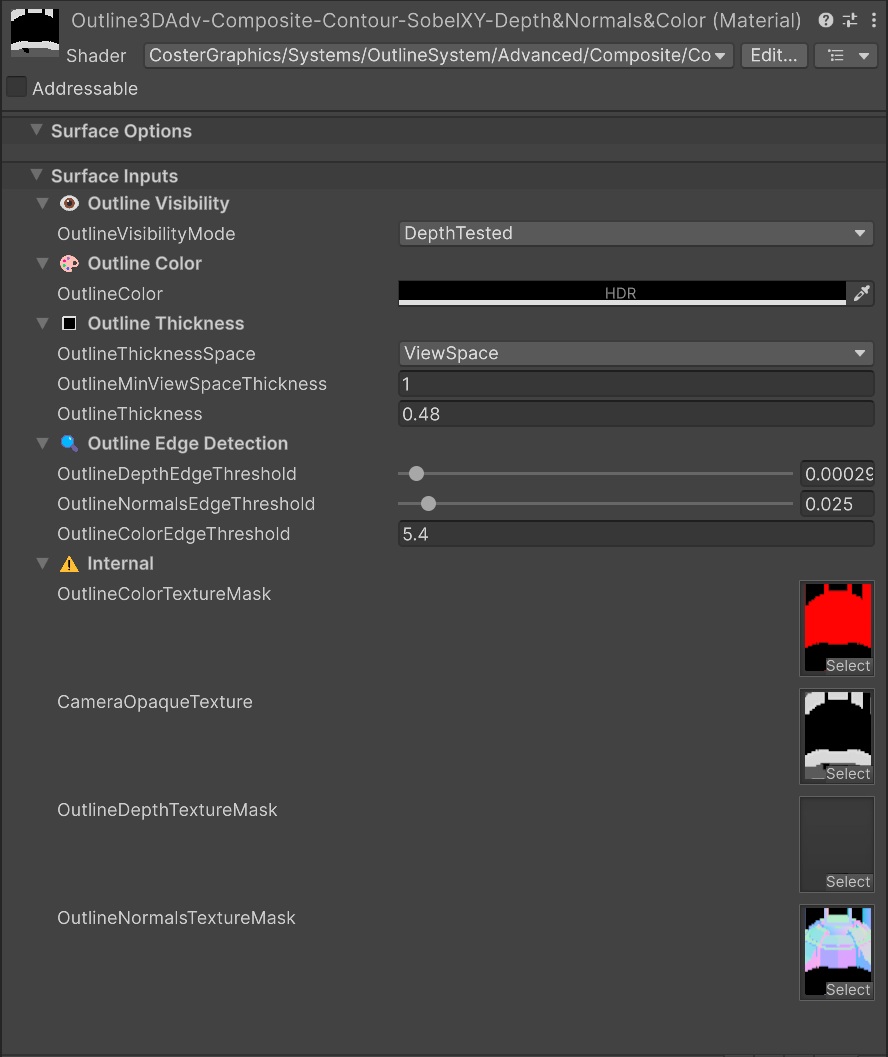
A typical full-screen 🖼️Composite shader has properties that can be adjusted for:
👁️ Outline Visibility- To show or hide outlines behind other non-outlined geometry🎨 Outline Colors🔳 Outline Thickness🌠 Outline Thickness Space- To toggle between thickness in🖥️Screen Spaceor in🎥View Space.🔍 Outline Edge Detection- Thresholds for Depth, Normals and Color edges.
At the bottom of the Composite shaders the properties of the masks that are used ⚠️Internal by the Composite shaders are automatically created and assigned to by the Outline3DRenderFeatures.
Read more about the different types of shaders that come with the OutlineSystem:
- 🕶️ Shaders Overview - Outline System Shaders Overview
- 🎭 Mask Shaders - Internal Mask Pass Shaders
- 🔁 Intermediate Shaders - Internal Intermediate Buffer Pass Shaders
- 🖼️ Final Composite Shaders - Final Full-Screen Composite Shaders