🔳 CosterGraphics.Systems.OutlineSystem
🌐 System Overview
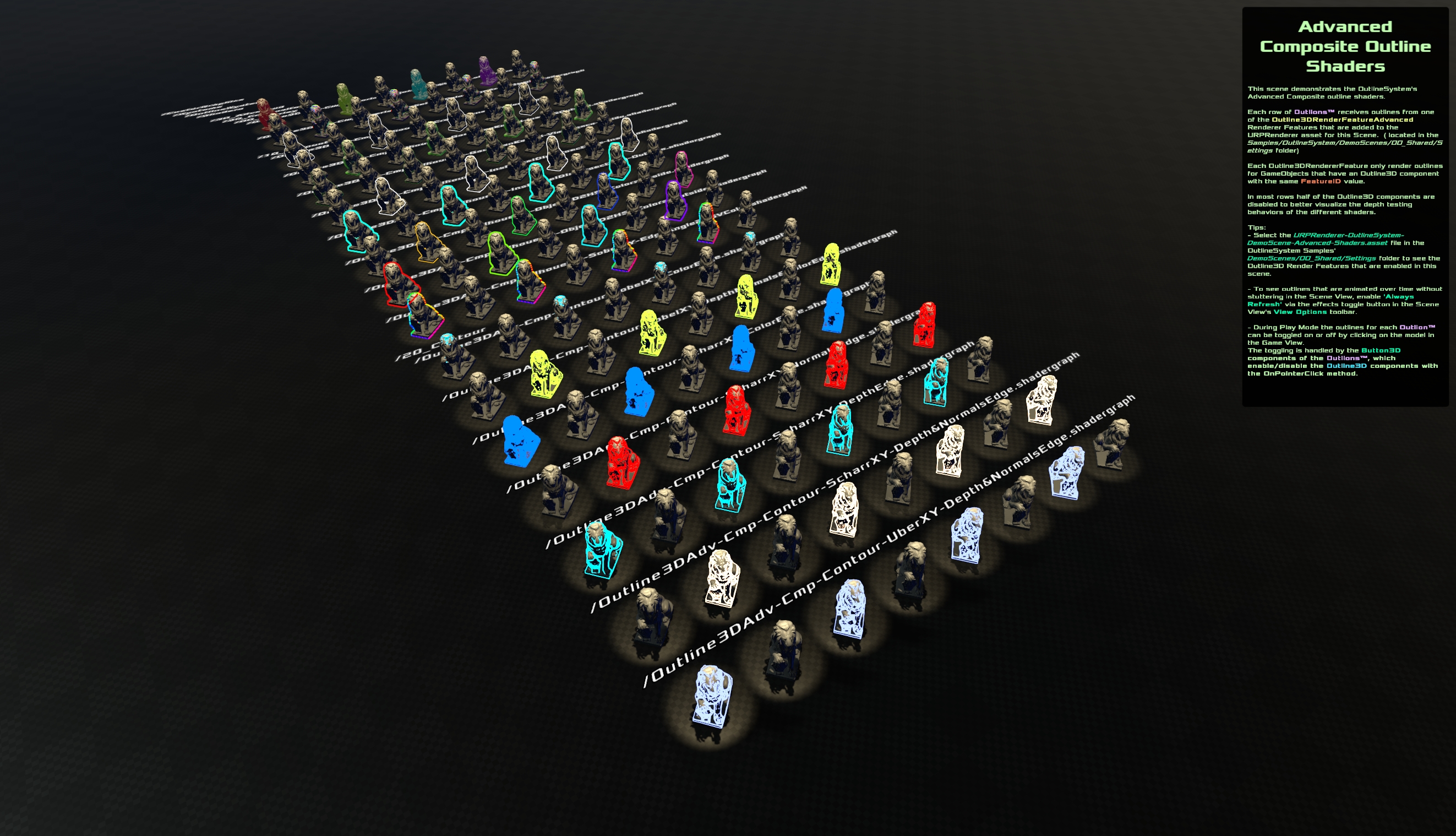
Each row of 🦁OutLions™️ receives outlines from one 🧑🎨Outline3DRenderFeature and one 🖼️Composite outline shader.
CosterGraphics OutlineSystem is a Full-screen, URP-based outline effects system for 3D GameObjects using Scriptable Renderer Features, Scriptable Render Passes, and the 🔳Outline3D Monobehaviour component.
This system allows you to draw sharp, controllable outlines around specific objects or the entire scene without requiring custom shaders on the objects themselves and without using 'inverted hull' mesh copies.
Outline texture masks are generated in dedicated mask passes and then calculated and composited into screen-space outlines using configurable materials and full-screen Shader Graph shaders.
⚙️ Core OutlineSystem Components
%%{
init:{
'flowchart':{
'nodeSpacing':16,
'rankSpacing':16
}
}
}%%
flowchart LR
subgraph OutlineSystem["🔳OutlineSystem Components Overview"]
direction LR
subgraph Shaders["🕶️ Shaders"]
direction TB
ShadersSimple(🖼️ Simple Composite Shaders<img src='../../../images/articles/Systems/OutlineSystem/Components/Shaders/10_Simple/30_Composite/CosterGraphics-Systems-OutlineSystem-Shaders-Simple-Composite-Overview.jpg'/><p align = 'right'>⭐</p>
)
click ShadersSimple href "Components/Shaders/10_Simple/Shaders.Simple.md"
ShadersBasic(🖼️ Basic Composite Shaders<img src='../../../images/articles/Systems/OutlineSystem/Components/Shaders/20_Basic/30_Composite/CosterGraphics-Systems-OutlineSystem-Shaders-Basic-Composite-Overview.jpg'/><p align = 'right'>⭐⭐</p>
)
click ShadersBasic href "Components/Shaders/20_Basic/Shaders.Basic.md"
ShadersAdv(🖼️ Advanced Composite Shaders<img src='../../../images/articles/Systems/OutlineSystem/Components/Shaders/30_Adv/30_Composite/CosterGraphics-Systems-OutlineSystem-Shaders-Adv-Composite-Overview.jpg'/><p align = 'right'>⭐⭐⭐ </p>
)
click ShadersAdv href "Components/Shaders/30_Adv/Shaders.Adv.md"
ShadersPro(🖼️ Pro Composite Shaders<img src='../../../images/articles/Systems/OutlineSystem/Components/Shaders/40_Pro/30_Composite/CosterGraphics-Systems-OutlineSystem-Shaders-Pro-Composite-Overview.jpg' /><p align = 'right'>⭐⭐⭐⭐</p>
)
click ShadersPro href "Components/Shaders/40_Pro/Shaders.Pro.md"
end
subgraph RendererFeatures["📜 Scriptable Renderer Features"]
direction TB
Outline3DRenderFeatureSimple(🧑🎨Outline3DRenderFeatureSimple<img src='../../../images/articles/Systems/OutlineSystem/Components/RendererFeatures/Outline3DRenderFeatureSimple/CosterGraphics-Systems-OutlineSystem-Outline3DRenderFeatureSimple.jpg' /><p align = 'right'>⭐</p>
)
click Outline3DRenderFeatureSimple href "Components/RendererFeatures/Outline3DRenderFeatureSimple.md"
Outline3DRenderFeatureBasic(🧑🎨Outline3DRenderFeatureBasic<img src='../../../images/articles/Systems/OutlineSystem/Components/RendererFeatures/Outline3DRenderFeatureBasic/CosterGraphics-Systems-OutlineSystem-Outline3DRenderFeatureBasic.jpg' /><p align = 'right'>⭐⭐</p>
)
click Outline3DRenderFeatureBasic href "Components/RendererFeatures/Outline3DRenderFeatureBasic.md"
Outline3DRenderFeatureAdv(🧑🎨Outline3DRenderFeatureAdv<img src='../../../images/articles/Systems/OutlineSystem/Components/RendererFeatures/Outline3DRenderFeatureAdvanced/CosterGraphics-Systems-OutlineSystem-Outline3DRenderFeatureAdv.jpg' /><p align = 'right'>⭐⭐⭐</p>
)
click Outline3DRenderFeatureAdv href "Components/RendererFeatures/Outline3DRenderFeatureAdv.md"
Outline3DRenderFeaturePro(🧑🎨Outline3DRenderFeaturePro<img src='../../../images/articles/Systems/OutlineSystem/Components/RendererFeatures/Outline3DRenderFeaturePro/CosterGraphics-Systems-OutlineSystem-Outline3DRenderFeaturePro_Foldout.jpg' /><p align = 'right'>⭐⭐⭐⭐</p>
)
click Outline3DRenderFeaturePro href "Components/RendererFeatures/Outline3DRenderFeaturePro.md"
end
subgraph MonoBehaviours["🧠MonoBehaviours"]
direction LR
Outline3D(🔳Outline3D<img src='../../../images/articles/Systems/OutlineSystem/Components/MonoBehaviours/CosterGraphics-Systems-OutlineSystem-Outline3DComponent.jpg'/>
)
click Outline3D href "Components/MonoBehaviours/Outline3D.md"
end
end
Outline3DRenderFeatureSimple
classDef default font-size: 12px;
style OutlineSystem font-size: 10px;
The OutlineSystem mainly consists of three types of core components:
🔳 Outline3D : MonoBehaviour
The system includes one default
🔳Outline3DMonoBehaviour component that can be added to any GameObject that needs outlines.
It marks the object for inclusion into the masking render passes of the🧑🎨Outline3DRenderFeatures.
🧑🎨 Outline3DRendererFeature : ScriptableRendererFeature
The system comes with four tiers of custom URP Scriptable Renderer Features that:
- collect all objects with the
🔳Outline3Dcomponent and the same🆔FeatureID - render them off-screen to texture masks
- apply a final full-screen
🖼️Compositepass outline shader to draw the outlines
- collect all objects with the
🕶️ Shaders : Shader Graph Outline Shaders & Materials
The system comes with a whole family of diverse and customizable
🖼️CompositeShader Graph edge detection outline shaders, for many different styles and use cases that are used by the Outline3D Renderer Features in the final Composite Render Pass.The OutlineSystem shaders are organized/classified into four tiers based on the level of the requirements they have. Currently there are
⭐Simple,⭐⭐Basic,⭐⭐⭐Advancedand⭐⭐⭐⭐Protier outline shaders.The main types of outline shaders you'll find in the
Shaders/folders of the Outline System package are:🔲Mask Overlays⭕Silhouette outlines🌐Contour outlines🎦Full-Screen FX outlines🐦🔥Hybrid outlines(Hybrids of Silhouettes+Contours, Masked outlines+Full-Screen effects and other variations.)
A final
🖼️Compositeoutline Shader Graph shader (e.g.,Basic-Cmp-Hybrid-Sil&Contours.shadergraph) commonly includes the following properties:🔳 Outline Thickness🌆 Background Color🎨 Outline Color🕵️ Outline Edge Detection Thresholds(For finetuning Color, Depth and Normals contour edges)🌠 Outline Thickness Space Mode Enum(Switch between thickness in Screen-Space pixel units or View-Space world units)👁️ Outline Visibility Mode(Enum to switch between Always Visible (see trough other objects) or Depth Tested (hidden behind other objects))🚦Outline Intersection Mode(Enum to switch from default silhouette outer perimeter only outlines to per-object outline intersections via the Advanced tier's InstanceIDs)
Read more about the Core Components on the OutlineSystem Components pages:
⚙️ Components Overview - Outline System Components Overview
🧠 MonoBehaviours
- 🔳 Outline3D Component - OutlineSystem
Outline3DMonoBehaviour Component
🧑🎨 Scriptable Renderer Features
- 🧑🎨 Renderer Features Overview - OutlineSystem Renderer Features Overview
- 🧑🎨Outline3DRenderFeatureSimple - Outline3D Render Feature Simple
- 🧑🎨🧑🎨Outline3DRenderFeatureBasic - Outline3D Render Feature Basic
- 🧑🎨🧑🎨🧑🎨Outline3DRenderFeatureAdv - Outline3D Render Feature Advanced
- 🧑🎨🧑🎨🧑🎨🧑🎨Outline3DRenderFeaturePro - Outline3D Render Feature Pro
🕶️ Shaders
- 🕶️ Shaders Overview - Outline System Shaders Overview
- 🎭 Mask Shaders - Internal Mask Pass Shaders
- 🔃 Intermediate Shaders - Internal Intermediate Buffer Pass Shaders
- 🖼️ Final Composite Shaders - Final Full-Screen Composite Shaders
- 🔳 Outline3D Component - OutlineSystem
⭐ System Tiers
The Outline System is organized into five tiers, Simple, Basic, Advanced, Pro and Hyper, each building on the previous with increasing complexity, features, and capabilities. This tiered structure ensures flexibility: you can start simple and upgrade only as needed, with full backward compatibility.
Outline Renderer Feature Tiers 🧑🎨🧑🎨🧑🎨
Renderer Features handle the rendering pipeline, collecting 🔳Outline3D objects and generating masks for outlines. Each tier adds more render passes for richer effects:
🧑🎨Simple Tier:
Runs only a few mask passes (e.g., basic binary white on black ⬜Color Texture Mask, 🧱Depth Tested Color Texture Mask). Produces simple ⭕Silhouette outlines, mask 🔲Overlays and 🎦FullScreen effects.
🧑🎨🧑🎨Basic Tier:
Adds ⬛Depth, 🟦Normals and 🟩UV passes. Enables 🌐Contour and 🐦🔥Hybrid Silhouette&Contour outlines and depth-tested masks.
🧑🎨🧑🎨🧑🎨Advanced Tier:
Includes per-object 🪪ObjectID Texture Mask and advanced edge-detection passes. Supports edge-detection convolution kernels (e.g., 🫧Sobel, ✂️Scharr, 🥐Laplacian).
🧑🎨🧑🎨🧑🎨🧑🎨Pro Tier:
Adds 🌊JFA (Jump Flood Algorithm) seed masking and intermediate jump-flood-fill passes for Distance Field and Signed-Distance Field based efficient and ultra-thick stylized outlines.
🧑🎨🧑🎨🧑🎨🧑🎨🧑🎨Hyper Tier:
Adds per-feature multiple composite passes support for efficiently reusing texture masks, for overlaying or chaining multiple camera effects (like multiple blur or dither passes, or for posterizing a grayscale filtered image) and for creating complex layered hybrid NPR styles.
Higher tiers include all the Lower-tier Render Passes, allowing for upgrades without breaking the existing lower tier setups.
Outline Shader Tiers 🕶️🕶️🕶️
The 🖼️Composite shaders of the OutlineSystem are Full-Screen Shader Graph assets used in the final render pass to blend masks into outlines. They're tiered by requirements and features:
🕶️Simple Tier Shaders: For Basic edge detection (e.g., dilation for silhouettes). Requires Simple-tier Renderer Feature.
🕶️🕶️Basic Tier Shaders: Adds depth/normals sampling for contours and hybrids. Requires Basic-tier Renderer Feature at minimum.
🕶️🕶️🕶️Advanced Tier Shaders: Incorporates object IDs and advanced edge detection kernels (e.g., Gaussian blur, Scharr). Requires Advanced-tier renderer feature at minimum.
🕶️🕶️🕶️🕶️Pro Tier Shaders: Includes Unsigned (for silhouette outlines on the outside of Outline3D objects) and Signed Distance field JFA outlines (for silhouette outlines on both the outside and/or inside of Outline3D objects). Requires Pro-tier renderer feature.
Shaders are backward-compatible: a Pro-tier renderer feature can render Simple, Basic, or Advanced tier shaders and skips any unused passes for efficiency.
🔄 Backward Compatibility
Renderer Features: A Pro-tier feature can run any lower-tier shader by conditionally executing only the required mask passes.
Shaders: A Basic tier shader works with Basic, Advanced, or Pro tier renderer features.
Usage: Mix and match! You can use a Pro feature with a Simple shader for quick prototyping, use a Simple shader for mobile and an Advanced shader for PC or stack a couple of Simple outlines instead of using one big complex outline shader. The Outline System's design can scale from lightweight outlines to full NPR effects while maintaining simplicity and reusability.
Read more about the Tiers structure on the OutlineSystem Tiers pages:
- ⭐ Tiers Overview - OutlineSystem Tiers Overview
- ⭐ OutlineSystem Simple - OutlineSystem Simple Tier
- ⭐⭐ OutlineSystem Basic - OutlineSystem Basic Tier
- ⭐⭐⭐ OutlineSystem Advanced - OutlineSystem Advanced Tier
- ⭐⭐⭐⭐ OutlineSystem Pro - OutlineSystem Pro Tier
- ⭐⭐⭐⭐⭐ OutlineSystem Hyper - OutlineSystem Pro Tier
🍳 The Kitchen Analogy
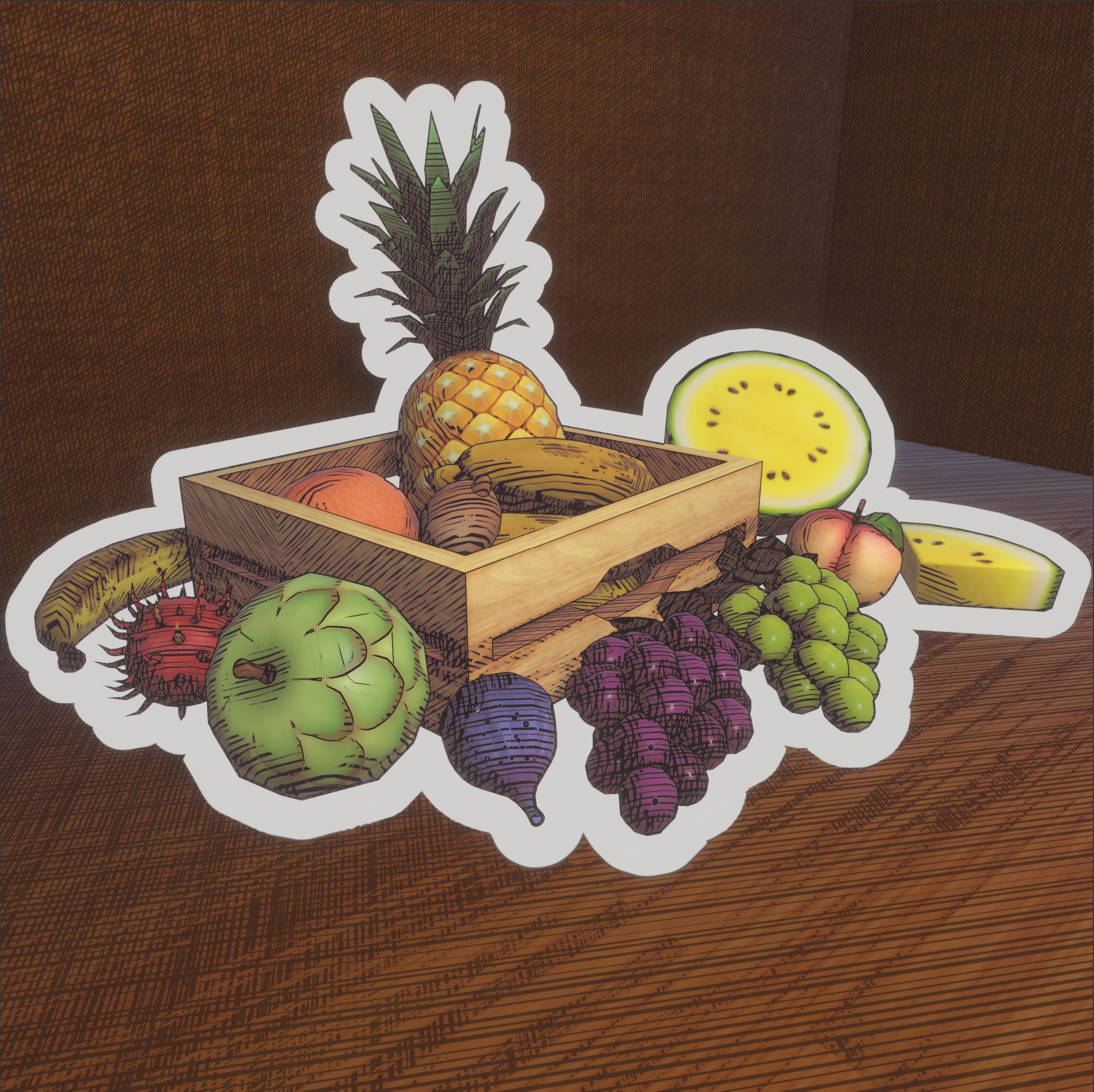
Think of the OutlineSystem as a kitchen where tasty full-screen outline 'dishes' are cooked and baked from scratch. Here is how the system's components would fit into this metaphor:
🧈 The Raw Ingredients (The Texture2D Masks): These are the raw materials like butter, cheese and eggs, generated by the Renderer Features. Each Texture2D image mask (color, depth, normals, UVs, ObjectIDs) is a raw ingredient. Without the ingredients the final outline dish can't be cooked.
🔪 The Prep Cooks (The Outline Renderer Features): The renderer features act as the prep cooks in the kitchen. They gather the "produce" (your Outline3D GameObjects), process them into usable ingredients through dedicated render passes. Simple-tier features handle only the basic ingredients (for instance black and white depth tested or not depth tested, binary color texture mask), while Basic, Advanced and Pro-tier features can prepare the more complex ingredients, like Depth, Normals, ObjectID masks or Voronoi UV fields.
🧑🍳 The Master Chef (The Final Composite Shader): The composite shader is the head chef who takes the prepped ingredients (in the form of Texture2Ds), performs complicated rituals, and blends it into the final dish.
🍝 The Dish (The Final Outline): The end result is the plated outline served directly to your scene's camera color buffer. Just like in a real kitchen, the quality of the dishes depend on the quality of the ingredients and the chef's skill level, but with backward compatibility, a Pro kitchen can also handle a Basic or Simple outline recipe.
In this setup, the tiers would represent kitchen upgrades or Michelin stars: you can start with a basic home setup (Simple) and scale to a professional restaurant later (Pro):
---
config:
theme: dark
look: neo
---
%%{
init:{
'flowchart':{
'nodeSpacing':16,
'rankSpacing':16
}
}
}%%
flowchart LR
subgraph Outline3DRenderFeature["🧑🎨Outline3DRenderFeature"]
direction LR
subgraph FinalDish["🍽️ Serve"]
direction TB
SceneCamera(
<img
src='../../../images/articles/Systems/OutlineSystem/OutlineSystemOverview/CosterGraphics-Systems-OutlineSystem-BasicScene-WithOutlines.jpg'
width='80'
/>🎥 Scene Camera)
end
subgraph Baking["🍳 Bake"]
direction TB
Composite("<img src='https://costergraphics.nl/images/articles/Systems/OutlineSystem/RenderPasses/019-CG_Systems-OutlineSystem-Outline3DBasic-Cmp-Cntr-Depth&Normals.jpg' width='80'/>🖼️ Composite Shader")
end
subgraph Ingredients["🥚Raw Ingredients"]
direction LR
Color("<img src='https://costergraphics.nl/images/articles/Systems/OutlineSystem/RenderPasses/001-CG_Systems-OutlineSystem-BasicScene-BinaryColorTextureMask.jpg' width='80'/>⬜ Outline Color Texture Mask")
Depth("<img src='https://costergraphics.nl/images/articles/Systems/OutlineSystem/RenderPasses/004-CG_Systems-OutlineSystem-BasicScene-DepthTextureMask.jpg' width='80'/>⚫ Outline Depth Texture Mask")
Normals("<img src='https://costergraphics.nl/images/articles/Systems/OutlineSystem/RenderPasses/005-CG_Systems-OutlineSystem-BasicScene-NormalsTextureMask.jpg' width='80'/>🟦 Outline Normals Texture Mask")
end
Color --> Composite
Depth --> Composite
Normals --> Composite
Composite --> SceneCamera
end