🔳 CosterGraphics.Systems.OutlineSystem
🏒 OutlineSystem Renderer Features' Render Passes Overview
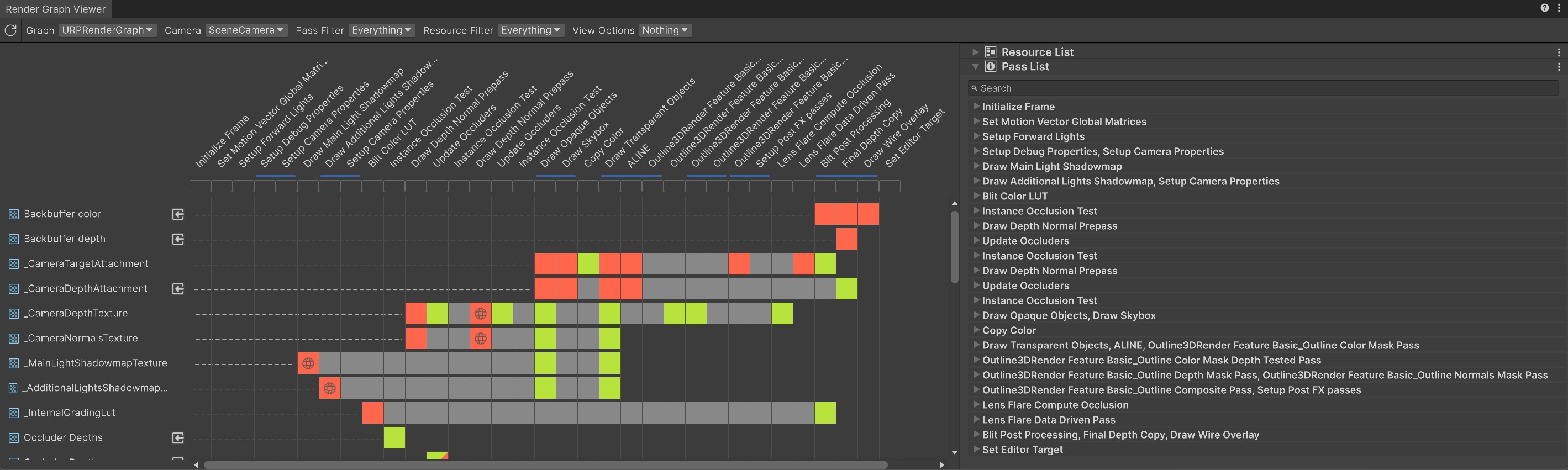
Render Passes are kind of like the '🔪prep cooks' in the Outline System's kitchen analogy. They generate the texture masks (the outline ingredients) that the Composite Shaders use to create the final outlines. Each pass runs in sequence during the URP Render Graph execution, producing textures off-screen for sampling in the final Full-Screen Shader Graph Composite shaders.
ℹ️ How the Render Passes Work
Purpose:
During the Render Passes data from 🔳Outline3D objects is collected (e.g., silhouettes, depths, normals) and stored/written into textures.
Execution:
The Render Passes are enqueued conditionally based on what the Final Composite Shader's expect. The masking Render Passes are only enqueued when the Composite shader has the corresponding Texture2D property.
Render Pass Types:
The 🎭Mask Render Passes generate data, the 🔁Intermediate and 🖼️Composite passes process and finalize the data.
🏒 The Outline System Render Passes
The Outline System includes the following passes, organized by tier. Click for more details:
🎭 Mask Passes (Generate Textures)
Simple Mask Passes
⬜ Outline Color Mask Pass: Renders basic silhouettes.
🧱 Outline Depth-Tested Color Mask Pass: Silhouettes with depth testing.
📸 Camera Color Copy Pass: Copies opaque scene color.Basic Mask Passes
⬛ Outline Depth Mask Pass: Renders object depths.
🟦 Outline Normals Mask Pass: Renders (view-space) normals.
🟩 Outline UV Mask Pass: Renders (object-space) UVs.Advanced Mask Passes
🟧 Outline Object-Space Position Mask Pass: Renders (Object-Space) fragment positions.
🪪 Outline Object ID Mask Pass: Stores per-object🪪ObjectIDs.Pro Mask Passes
🌊🌱 JFA Seeds Mask Pass: Generates UV Seeds texture for JFA (Jump Flood Algorithm).
🔁 Intermediate Passes (Process Data)
Pro Intermediate Passes
🌊🦘 JFA Seeds Copy & Jump Passes: JFA Copy & Jump-flood-fill passes for (signed) distance fields.
🖼️ Final Composite Pass (Finalizes Data)
🖼️ Final Composite Pass: Final Full-Screen Composite Pass. Processes masks into screen-space outlines.
🏒 Outline3DRenderFeature Render Pass Flow Chart
---
config:
    theme: dark
---

flowchart TD
    A(⬜ Color Mask Pass)
    B(🧱 Depth-Tested Color Mask Pass)
    C(📸 Camera Color Copy Pass)
    D(⬛Depth/🟦Normals/🟩UVs/🟧ObjPositions/🪪ObjectIDs Mask Passes)
    E(🌊🌱 JFA Seeds Passes)
    F(🌊🦘 JFA Jump Flood Fill Passes)
    G(🖼️ Final Outline Composite Pass)

    A --> B
    B --> C
    C --> D
    D --> E
    E --> F
    F --> G
⭐ OutlineSystem Tier Usage
- 🧑🎨Outline3DRenderFeatureSimple: Color Mask + Depth Tested Color Mask + Final Composite Render Passes.
- 🧑🎨🧑🎨Outline3DRenderFeatureBasic: Adds Depth/Normals/UV Mask Render Passes.
- 🧑🎨🧑🎨🧑🎨Outline3DRenderFeatureAdvanced: Adds Object ID Mask Pass and Object Space Position Mask Pass
- 🧑🎨🧑🎨🧑🎨🧑🎨Outline3DRenderFeaturePro: Adds JFA (Jump Flood Algorithm) Render Passes for SDF (Signed Distance Field) outlines.
For setup, see Renderer Features. Questions? Check Troubleshooting.