🔳 CosterGraphics.Systems.OutlineSystem
⭐⭐⭐⭐ OutlineSystem Pro Tier
Pro Tier Renderer Feature and Render Passes
The Pro tier adds 🦘JFA(Jump Flood Algorithm) DF(Distance Field) and SDF(Signed Distance Field) outlines to the pipeline, which are a different type of outline than the type that is created by the 'sampling the neighboring pixels in a radius' methods of the lower tiers.
Where the sampled radius outlines from the lower tiers have the disadvantage of becoming very expensive when using a relatively large sample radius to get very thick outlines, the JFA-SDF outlines don't really suffer from that limitation and scale much better when it comes to outline thickness relative to screen size.
In a nutshell how the JFA algorithm works is that it takes (a copy of) a 🌱seeds texture, with the (screen-space) UV coordinates of only the masked Outline3D geometry pixels as the seeds as input, then in a for-loop, the Jump Flood Algorithm jump-flood-fills the unmasked areas of the seeds texture with the UVs of the closest masked pixels.
🪣The traditional paintbucket tool, used for automatically filling in regions of images with color in drawing applications like Paint, GIMP and Photoshop etcetera works in almost the same way but where the traditional paint bucket flood-fill works by spreading one pixel at a time to neighbor pixels, the JFA 'jumps' in exponentially decreasing step sizes, which gives it a logarithmic efficiency.
When the flood fill loop is finished after a couple of itterations of the loop, every point outside of the mask stores the location of the closest point on the mask:
flowchart LR
%%{init:{'flowchart':{'nodeSpacing': 32, 'rankSpacing': 32}}}%%
OutlineJFAUVSeedsMaskPass_Outside(
<div class="FlowChartNodeCard"><div class="Body"><div class="Header"><div class="Name"><b>OutlineJFAUVSeedsMaskPass_Outside</b></div><div class="Icon">🌱🏞️</div></div><div class="Image"><img src='../../../../images/articles/Systems/OutlineSystem/RenderPasses/OutlineJFAUVSeedsMaskPass_Outside/CosterGraphics-Systems-OutlineSystem-OutlineJFAUVSeedsTextureMask_Outside.jpg'/></div><div class="Description">The JFA UV Seeds Mask texture, generated by the OutlineJFAUVSeedsMaskPass_Outside Render Pass, before it goes into the flood fill loop.<br/>The mask texture is copied before it goes into the loop so the original can still be used (for instance as a screen-space UV overlay) by the final Composite pass shaders via the Texture2D _OutlineJFAUVSeedsTextureMask_Outside property.</div></div></div>
)
subgraph JFALoopOutside [🌊JFA Flood Fill Loop]
OutlineJFAUVHorizontalJumpPass_Outside(
<div class="FlowChartNodeCard"><div class="Body"><div class="Header"><div class="Name"><b>OutlineJFAUVHorizontalJumpPass_Outside</b></div><div class="Icon">↔️🦘🏞️</div></div><div class="Image"><img src='../../../../images/articles/Systems/OutlineSystem/RenderPasses/OutlineJFAUVHorizontalJumpPass_Outside/CosterGraphics-Systems-OutlineSystem-OutlineJFAUVJumpTextureMask_Outside.jpg'/></div><div class="Description">The Outside UV Voronoi field texture generated by the JFA flood-fill loop. The JFA loop runs multiple separate Horizontal and Vertical jump passes to generate the final result. The Pro Composite JFA Distance Field shaders retrieve this texture via the Texture2D _OutlineJFAUVJumpTextureMask_Outside property and generate the distance field outlines from it. This texture isn't really meant to look at since it shows horizontal and vertical UV coordinates translated to red and green colors. The distance field that's generated from it, which you can see in the next image, visually does make sense!</div></div></div>
)
end
OutlineJFAUVSeedsMaskPass_Outside --> JFALoopOutside
How many itterations it takes for the JFA loop to fill the screen depends on the resolution of the screen with an inversely proportional relationship. More specifically, the number of iterations scales as log₂(N) where N is the screen's largest dimension. A higher resolution requires more iterations of the loop, but only logarithmically, so doubling the resolution only adds one extra iteration. In the diagram below you can see this relationship. For a 4k resolution the JFA loop runs 12 itterations:
xychart-beta
    title "JFA Iterations vs Screen Size"
    x-axis [2, 4, 8, 16, 32, 64, 128, 256, 512, 1024, 2048, 4096]
    y-axis "Iterations" 2 --> 13
    line [2, 3, 4, 5, 6, 7, 8, 9, 10, 11, 12]
ℹ️ During the JFA loop the
🧑🎨Outline3DRenderFeatureProuses temporary 'ping-pong' render textures to store the intermediate jump-flood-fill results. The ping-pong textures aren't useful as 'outline ingredients' so they're not used anywhere else but you can see what they look like in the Frame Debugger window. In the image below you can see the partially flood-filled JFA ping texture:
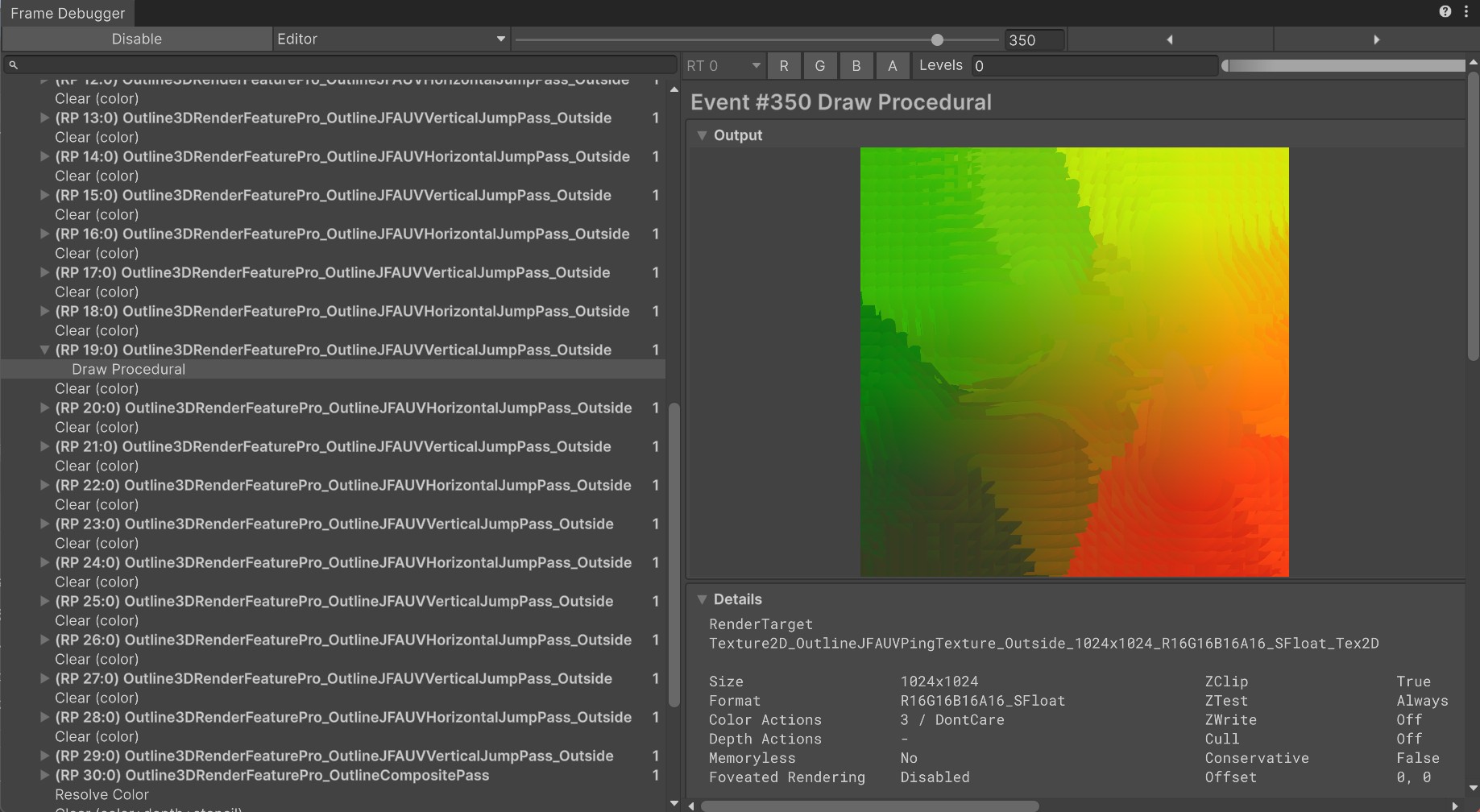
From the UV coordinates of the final jump flood filled texture mask the final full-screen composite Pro JFA outline shaders calculate a distance field that can be used to generate outlines outside of the masked geometry with by stepping (or smoothstepping) over the distances with a certain threshold:
flowchart TB
%%{init:{'flowchart':{'nodeSpacing': 32, 'rankSpacing': 16}}}%%
subgraph OutlineCompositePass [🖼️OutlineCompositePass]
OutlineCompositePass_DF(
<div class="FlowChartNodeCard"><div class="Body"><div class="Header"><div class="Name"><b>Raw Silhouette Distance Field Outside</b></div></div><div class="Image"><img src='../../../../images/articles/Systems/OutlineSystem/RenderPasses/OutlineCompositePass/CosterGraphics-Systems-OutlineSystem-OutlineJFA-UVDistanceField_Outside.jpg'/></div><div class="Description">The raw screen-space Distance Field generated from the Texture2D_OutlineJFAUVJumpTextureMask_Outside Voronoi UV field by the default Pro Composite Silhouette JFA UV Distance Field outline shader.<br/> (<i>Pro-Cmp-Sil-JFA-UV-DF-Default.shadergraph</i>)<br/><br/> From the distance field the full-screen composite shader can generate outlines with sharp edges by stepping over a fixed distance or smooth edges with soft transitions by smooth stepping from one distance to another.</div></div></div>
)
OutlineCompositePass_Outline(
<div class="FlowChartNodeCard"><div class="Body"><div class="Header"><div class="Name"><b>Silhouette JFA UV Distance Field Outlines </b></div></div><div class="Image"><img src='../../../../images/articles/Systems/OutlineSystem/RenderPasses/OutlineCompositePass/CosterGraphics-Systems-OutlineSystem-Pro-Cmp-Sil-JFA-UV-DF-Default.jpg'/></div><div class="Description">Semi-sharp outlines generated from the Silhouette Distance Field by the default Pro Composite Silhouette JFA UV Distance Field outline shader.<br/>(<i>Pro-Cmp-Sil-JFA-UV-DF-Default.shadergraph</i>)<br/><br/>For this image the shader uses a black background color and a plain white outline color. What is neat about distance field based outlines is that the distance that is used for the thickness can also be used for transitioning from one outline color to another over the thickness of the outline, which is what the also included 'Pro Composite Silhouette JFA UV Distance Field Two Color Blend' shader does.<br/>(<i>Pro-Cmp-Sil-JFA-UV-DF-2ColorBlend.shadergraph</i>).</div></div></div>
)
end
OutlineCompositePass_DF --> OutlineCompositePass_Outline
When the JFA algorithm is seeded with an inverted mask that has seeds for each pixel outside of the masked geometry instead of on the inside, then the inside of the masked Outline3D geometry gets flood filled with the UV coordinates of the closest edges from inside the mask instead. From this flipped UV Voronoi field the final Pro Composite shaders can generate a distance field not on the outside but on the inside of the masked geometry:
flowchart LR
%%{init:{'flowchart':{'nodeSpacing': 32, 'rankSpacing': 32}}}%%
OutlineJFAUVSeedsMaskPass_Inside(
<div class="FlowChartNodeCard"><div class="Body"><div class="Header"><div class="Name"><b>OutlineJFAUVSeedsMaskPass_Inside</b></div><div class="Icon">🌱🏠</div></div><div class="Image"><img src='../../../../images/articles/Systems/OutlineSystem/RenderPasses/OutlineJFAUVSeedsMaskPass_Inside/CosterGraphics-Systems-OutlineSystem-OutlineJFAUVSeedsTextureMask_Inside.jpg'/></div><div class="Description">The JFA UV Seeds Mask texture, generated by the OutlineJFAUVSeedsMaskPass_Inside Render Pass, before it goes into the flood fill loop.<br/>The mask texture is copied before it goes into the loop so the original can still be used (for instance as a screen-space UV overlay) in the Pro final Composite pass shaders via the <b>_OutlineJFAUVSeedsTextureMask_Inside</b> Texture2D property.</div></div></div>
)
subgraph JFALoop [🪣JFA Flood Fill Loop]
OutlineJFAUVHorizontalJumpPass_Inside(
<div class="FlowChartNodeCard"><div class="Body"><div class="Header"><div class="Name"><b>OutlineJFAUVHorizontalJumpPass_Inside</b></div><div class="Icon">↔️🦘🏠</div></div><div class="Image"><img src='../../../../images/articles/Systems/OutlineSystem/RenderPasses/OutlineJFAUVHorizontalJumpPass_Inside/CosterGraphics-Systems-OutlineSystem-OutlineJFAUVJumpTextureMask_Inside.jpg'/></div><div class="Description">The Inside UV Voronoi field texture generated by the JFA flood-fill loop. The JFA loop runs multiple separate Horizontal and Vertical jump passes to generate the final result. The Pro Composite JFA Distance Field shaders can retrieve this texture via the <b>_OutlineJFAUVJumpTextureMask_Inside</b> Texture2D property and can generate distance field outlines from it on the <em>inside</em> of the Outline3D geometry for the 'signed' portion of the Signed Distance Field.</div></div></div>
)
end
OutlineJFAUVSeedsMaskPass_Inside --> JFALoop
ℹ️ To make the whole outside/inside and horizontal/vertical duality of the JFA masks and render passes etcetera a little bit less confusing combinations of Emoji symbols are used in some places of the system where it makes sense to do so.
↔️🦘🏠can be read as Horizontal Jump Pass Inside and↕️🦘🏞️can be read as Vertical Jump Pass Outside. For a complete overview of the meanings of all the symbols see the Outline System Glossary:📙 Glossary - Glossary of Terms like "ULP," "Render Graph" and the meaning of the Outline System's Emoji Symbols
By combining both results and adding the sign (-) to the pixels on the inside of the mask, a signed distance field can be created with positive distances to the edges of the mask on the outside and negative distances to the edges on the the inside of the masked geometry:
flowchart TB
%%{init:{'flowchart':{'nodeSpacing': 32, 'rankSpacing': 16}}}%%
subgraph OutlineCompositePass [🖼️OutlineCompositePass]
OutlineCompositePass_SDF(
<div class="FlowChartNodeCard"><div class="Body"><div class="Header"><div class="Name"><b>Raw Silhouette Signed Distance Field Outside & Inside</b></div></div><div class="Image"><img src='../../../../images/articles/Systems/OutlineSystem/RenderPasses/OutlineCompositePass/CosterGraphics-Systems-OutlineSystem-OutlineJFA-UVDistanceField_Outside&Inside.jpg'/></div><div class="Description">The raw screen-space Signed Distance Field generated from the Texture2D_OutlineJFAUVJumpTextureMask_Outside and Texture2D_OutlineJFAUVJumpTextureMask_Inside Voronoi UV fields by the default Pro Composite Silhouette JFA UV Signed Distance Field outline shader.<br/> (<i>Pro-Cmp-Sil-JFA-UV-SDF-Default.shadergraph</i>)<br/><br/> From the signed distance field the full-screen composite shader can generate outlines on the outside as well as on the inside of the Outline3D geometry.</div></div></div>)
OutlineCompositePass_Outline(
<div class="FlowChartNodeCard"><div class="Body"><div class="Header"><div class="Name"><b>JFA Signed Distance Field Silhouette Outlines </b></div></div><div class="Image"><img src='../../../../images/articles/Systems/OutlineSystem/RenderPasses/OutlineCompositePass/CosterGraphics-Systems-OutlineSystem-Outline3DPro-Cmp-Slhtt-JFA-UVSignedDistanceField-Default-1.jpg'/></div><div class="Description">SDF outlines generated from the Silhouette Signed Distance Field by the default Pro Composite Silhouette JFA UV Signed Distance Field outline shader.<br/>(<i>Pro-Cmp-Sil-JFA-UV-SDF-Default.shadergraph</i>)<br/><br/>For this image the shader uses a black background color and red and green outline colors for the inside and the outside.The default SDF outline shader has properties for controlling the Outside and Inside outlines individually so it is possible to have a different thickness, color and softness for both, for instance you can choose a soft glowing outline on the inside and a sharp opaque outline on the outside of the Outline3D geometry!</div></div></div>)
end
OutlineCompositePass_SDF --> OutlineCompositePass_Outline
ℹ️ The OutlineSystem package includes 🖼️Composite
Testshaders for each of the generated JFA textures (the raw Pro 'outline ingredients') that can be useful for debugging or as examples in the OutlineSystem's Pro Shaders folder. The Composite Pro Test shaders can be viewed just like the regular Composite outline shaders, by assigning them to the final Composite material field of the🧑🎨Outline3DRenderFeatureProScriptable Renderer Feature.
Pro Tier Shaders
The Pro tier comes with separate generic/default shaders for Silhouette Distance Field outlines (Outlines on the outside of the Outline3D geometry) and Signed Distance Field outlines (Outlines on both the outside & inside of the Outline3D geometry):
Images
The Pro tier also includes default shaders for Contour Distance Field outlines, which are outlines based on distance fields generated from a contour outline UV seeds masks instead of the default silhouette UV seeds mask.
Image of Contour UV seeds mask --> Image of Contour Voronoi field mask --> Image of raw Contour DF --> Image of raw Contour DF outlines
The distance fields generated for the contour outlines store the distances to the closest contour edges which are very thin by themselves so making them 'signed' isn't really necessary because there isn't really an 'inside' to the contour lines since they're basically only one or a few pixels thick.
To quickly summarize,.. the Pro tier comes with JFA 🏞️Outside & 🏠Inside Signed Distance Field Silhouette Outines and JFA 🏞️Outside Distance Field Contour Outlines
Image of JFA Silhouette DF | Image of Silhouette SDF | Image of Contour DF outlines |
    flowchart LR
    SilhouetteSeedsMaskOutside --> OutsideSilhouetteUVVoronoiField --> OutsideSilhouetteDF --> OutsideDFSilhouetteOutlines
    flowchart LR
    InsideSilhouetteUVSeedsMask --> InsideSilhouetteUVVoronoiField --> InsideSilhouetteDF --> InsideSilhouetteDFOutlines
    flowchart LR
    OutsideContourUVSeedsMask --> OutsideContourUVVoronoiField --> OutsideContourDF --> OutsideContourDFOutlines